Angel Keyboard Mouse Recorder
In most games, you constantly need to repeat fixed operations, such as opening treasure boxes and fishing in Dungeon & Fighter (DNF). Repetitive manual work wastes plenty of time and energy. This macro recorder can fully automate all fixed keyboard and mouse sequences for you. It works perfectly for both gaming repetitive tasks and daily office workflow automation.
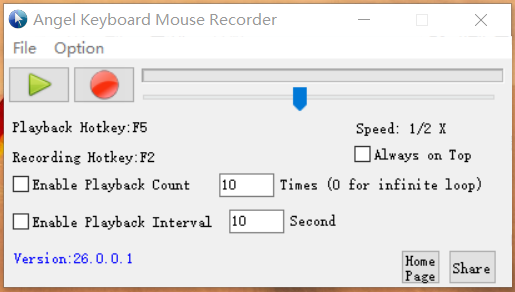
Main Operation Control Panel
Record, playback, loop count & playback speed settings
Core Powerful Features
Easy-to-use macro recording tool to record, save and replay all mouse & keyboard actions
Full Mouse & Keyboard Recording
Capture entire mouse movement paths, clicks and all keystroke inputs completely. Every manual operation can be recorded accurately for later replay.
Custom Hotkey Control
F1 for playback start/stop, F2 for recording start/stop. Same hotkey toggles status conveniently without switching software windows.
Adjustable Loop Playback
Set custom replay times freely; enter 0 to enable unlimited infinite loop playback for long-time repetitive tasks.
Playback Interval Setting
Customize waiting interval between each playback cycle to adapt to different game and software execution requirements.
Variable Speed Simulation
Speed up or slow down recorded keyboard & mouse actions flexibly to meet diverse usage scenarios.
Clean Portable Program
No adware, no bundled plugins, single standalone executable file. Lightweight, no junk files generated on your system.
Step-by-Step Operation Guide
How To Use The Recorder
- Launch the software to enter the main control interface.
- Click the red button to start recording keyboard and mouse operations; click the green button to execute recorded scripts.
- Hotkey shortcut: Press F2 to start/stop recording; Press F1 to start/stop playback.
- Configure total playback cycles: Input 0 to activate endless loop playback.
- Set custom time interval between each playback round according to your needs.
- Adjust playback speed to simulate faster or slower manual operation rhythm.
Note: Antivirus software may trigger false positives due to input simulation characteristics. Please add this program to your trusted list manually.
System Requirements
Ultra-lightweight application, runs smoothly on all Windows desktop PCs
Operating System
Windows XP / 7 / 8 / 10 / 11 (32bit & 64bit)
Disk Space
Less than 2MB free disk space required
Runtime Dependencies
No extra frameworks needed, run directly after download
Usage Scenarios
Gaming Macro & Office Automation