Angel Keyboard Remapper
Angel Keyboard Remapper is a professional keyboard key modification tool. It supports single key replacement, double-key combination, triple-key integration and software simulation. It will never cause any damage to your keyboard hardware or system files, completely green, tiny size and extremely easy to operate.
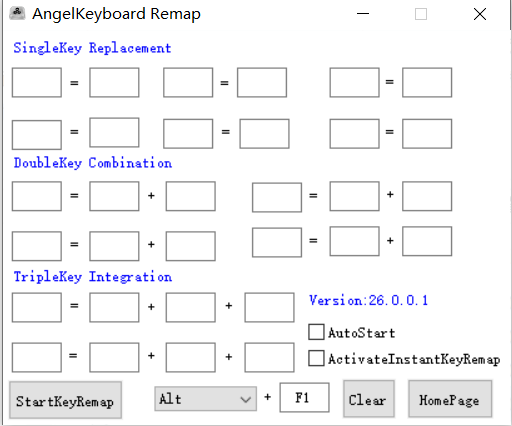
Main Key Remapping Control Panel
Configure key replacement, combinations and toggle hotkeys
Core Powerful Features
Secure keyboard remap utility for gamers, typists and office workers
Multi-Mode Key Remapping
Flexibly modify keyboard input operations, support single key replacement, double-key combination and triple-key integration to customize your exclusive keyboard layout.
Hotkey Toggle Switch
Set custom global hotkeys to quickly enable or disable key remapping function anytime without opening the main window frequently.
Virtual Machine Support
The software runs stably inside all mainstream virtual machine environments for flexible use scenarios.
100% Green Clean Software
No bundled plugins, no advertisements, no registry modification. Only one standalone executable file, lightweight and portable.
No Hardware & System Damage
Adopts pure software simulation technology, will not write data to keyboard firmware or system core files, completely safe for your devices.
Full Windows Compatibility
Perfectly compatible with Windows XP, Windows 7, Windows 8, Windows 10 and Windows 11 both 32-bit and 64-bit editions.
Update Notes
Official Version Changelog
- Supports keyboard key operation modification, including single-key replacement, double-key combination and triple-key integration functions
- Added independent hotkey control to quickly turn on and off the key remapping switch
- Optimized kernel to support stable running under virtual machines, compatible with Windows XP /7 /8 /10 /11 systems
- Pure green single-file program, no plugins, no adware, easy installation and operation
- Antivirus software may trigger false positives; please add this program to trusted list inside your security software manually
System Requirements
Ultra-lightweight program, runs smoothly on all old and new Windows PCs
Operating System
Windows XP / 7 / 8 / 10 / 11 (32bit & 64bit)
Disk Storage
Less than 2MB free disk space required
Runtime Environment
No extra runtime libraries needed, run directly
Extra Feature
Virtual Machine Running Supported