Angel Mouse Auto Clicker
Angel Mouse Auto Clicker is a handy auxiliary tool that fully automates massive repetitive left and right mouse clicks. It saves your time & energy during gaming and daily work, reduces mouse hardware wear caused by endless manual clicking.
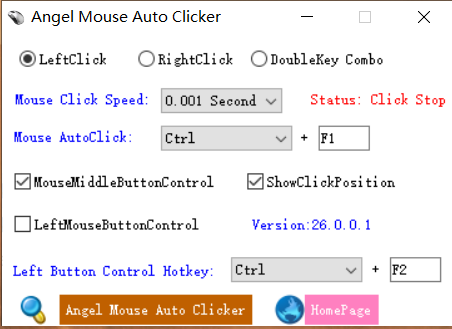
Main Control Panel
Configure click buttons, speed and global hotkeys
Core Powerful Features
Pure green lightweight auto click solution designed for gamers and office users
Multi-Mouse Button Click
Supports left click, right click, middle mouse button and combined double-click functions. Flexible time interval selection for customized tapping frequency.
Global Custom Hotkeys
Set personalized hotkeys to start and pause auto clicking instantly without switching software windows frequently.
Driver-Level Click Mode
Exclusive driver running mode bypasses click interception of most games & software to fix invalid clicking issues completely.
Wide Gaming Compatibility
Works stably for CrossFire, Dream Three Kingdoms, various web games and online chat rooms for continuous automatic clicking tasks.
Single File Green Software
Zero plugins, no bundled advertisements, no registry modifications. Only one executable file, tiny volume, run directly after downloading.
VM & Full Windows Support
Stably operates inside virtual machines. Fully compatible with Windows XP / 7 / 8 / 10 32-bit and 64-bit systems.
Update Notes
Official Version Changelog
- Supports left, right, middle mouse button control, double-click function, customizable hotkeys and multiple time interval options
- Added mouse driver-level click mode to thoroughly solve the problem of intercepted and ineffective clicks
- Optimized kernel program to support normal running under all mainstream virtual machine environments
- Full compatibility with Windows XP, Windows 7, Windows 8, Windows 10 operating systems
- Antivirus programs may trigger false positives due to driver characteristics; please add this software to trusted list manually
System Requirements
Ultra-lightweight program, runs smoothly on all old and new Windows PCs
Operating System
Windows XP / 7 / 8 / 10 (32bit & 64bit)
Disk Space
Less than 2MB free storage required
Runtime Environment
No extra frameworks or DLL dependencies needed
Extra Support
Virtual Machine Running Available