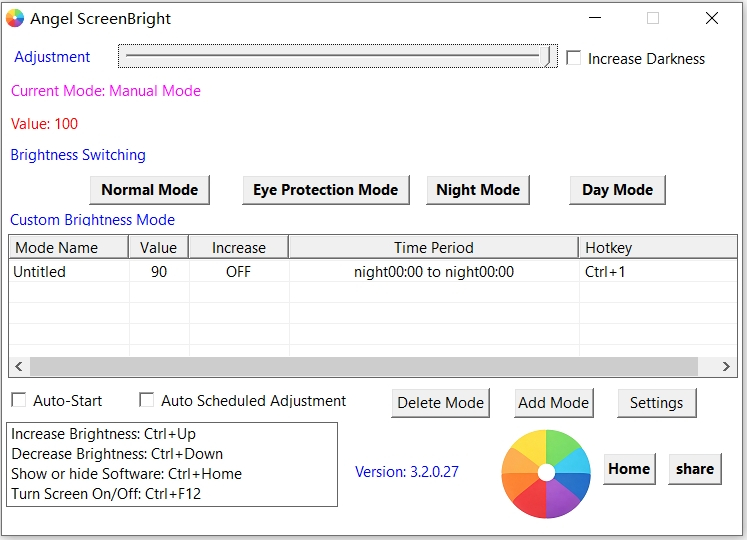
Main Interface – Brightness Control Panel
About Angel ScreenBright
Angel ScreenBright is a lightweight, clean desktop utility designed only for Windows systems, used to adjust brightness for multiple monitors freely.
It uses a pure software overlay algorithm to adjust screen brightness. It will not modify any core system files or damage your monitor hardware, so you can use it safely and stably for a long time.
Two versions are offered to meet different usage needs:
Free Edition | Permanent Freeware
- Totally free for personal use forever
- No advertisements, no browser homepage hijacking, no bundled programs or hidden plugins
- All basic brightness adjustment functions available for office work, web browsing and daily use
- Single independent executable file, small size, easy to save and copy to other devices
Pro Lifetime Edition | Paid Premium License
- Pay once to get permanent access to all advanced professional functions.
- It is specially designed for gamers, graphic designers, users with multiple monitors and remote workers.
Shared Core Features (Available for Free & Pro Versions)
- Precise stepless brightness adjustment for all connected monitors
- Safe software brightness adjustment, no damage to monitors or Windows system
- Small file size, concise interface and easy operation
- Built-in eye protection mode for long-time screen use
- Automatically adapt to system language, supports multiple languages worldwide
- Fully compatible with all mainstream virtual machine software
- Supports Windows XP / 7 / 8 / 10 / 11 (32-bit & 64-bit)
Exclusive Advanced Pro Features
- Custom global hotkeys for brightness adjustment and one-click screen off
- Automatic scheduled brightness change according to your daily schedule
- Ultra deep dimming mode: adjust brightness below the lowest hardware limit of monitors
- RGB color calibration to improve display effect of old and faded monitors
- Create unlimited brightness presets, assign separate hotkeys to each preset
- Stable automatic startup with background tray running permission
- Priority technical support and lifetime free software updates
Screenshots
Preview the clean interface of Angel ScreenBright
Powerful Features
Angel ScreenBright delivers professional and flexible brightness management for all Windows users
Smart Brightness Adjustment
Freely brighten or dim your screen via software overlay. No modification to hardware or system settings, extend monitor lifespan safely.
Fully Customizable Hotkeys
Set your own keyboard shortcuts for instant brightness tuning. Boost efficiency for office, design and gaming workflows.
Eye Care Mode
Multiple display presets to reduce blue light and eye strain. Comfortable viewing experience during long PC sessions.
Multi-Language Support
Supports global languages with automatic detection. Smooth experience for international users worldwide.
Clean & Portable
No adware, no extra components. Single executable file, lightweight. No registry writes, no junk files generated.
Wide Windows Compatibility
Fully works on Windows XP / 7 / 8 / 10 / 11, 32-bit & 64-bit. Supports virtual machine environments.
System Requirements
Broad compatibility, runs smoothly on ordinary PCs
Operating System
Windows XP / 7 / 8 / 10 / 11
Storage Space
Only 2 MB free disk space
System Architecture
32-bit / 64-bit compatible
Runtime
No extra libraries required, run directly